Case study 02
Kasenso POS
“You sell. We count.” A cloud point-of-sale built for small and medium food businesses, not enterprise chains. Take orders, run the kitchen, track inventory, manage staff, and see sales the moment they happen, all from a phone or tablet.
Challenge
The challenge
Most POS systems in the Philippine SMB market are too expensive, too complex, or designed for a Western retail context that doesn't match local business realities. Carinderias, fried-chicken and milk-tea shops, and market stall vendors need something that works with how they actually operate.
The challenge: design a POS that feels as fast as cash. It needed zero learning curve for first-time users, had to work on a low-cost phone or tablet, and had to handle local realities like peso denominations, loose item quantities, flavor add-ons, and daily cash reconciliation, even when the internet drops mid-rush.
Solution
The solution
Kasenso strips the counter down to the essentials (a clean checkout, fast product search, and a cash tender flow built for speed) and then quietly does the counting in the background. Large tap targets and minimal cognitive load let cashiers process orders without studying the screen.
- Touch-first POS for dine-in, takeout, and delivery, with flavor and add-on choices
- Kitchen Display System: orders land in the kitchen instantly, with no paper tickets
- Inventory that deducts itself from recipes, plus wastage, low-stock, and expiry alerts
- Recipe costing with true food cost, margin, and a health check per item
- Shifts with cash reconciliation, void tracking, and role-based staff access
- Reports, CSV export, and a nightly Manager's Daily Report
- Online ordering storefront with a shareable link and a customer database
- KAISHA: an AI marketing assistant that drafts Facebook posts from the week's sales
- Offline-first: keep selling when the internet drops, auto-sync when it's back
- Bluetooth receipt printing and a native Android app on Google Play
Under the hood: an Android app plus an installable PWA with offline support, Firebase and Firestore, Cloud Functions, scheduled reporting jobs, and AI-assisted marketing copy. I own the Play Console releases, app signing, and customer support.
- Next.js
- React
- TypeScript
- Firebase
- Firestore
- Cloud Functions
- Capacitor (Android)
- PWA
- Play Console
Process
My process
I spent time in real stores and food stalls doing contextual observation: watching how owners track sales, where friction happens, and what shortcuts they already use. The design came from those observations, not assumptions.
- Contextual inquiry sessions with small business owners and cashiers in Metro Manila
- Journey mapping of the full transaction cycle, from product lookup to receipt to end-of-shift count
- Sketching and rapid paper prototyping to validate checkout flow concepts
- Tablet-first wireframes with accessibility and glare resistance in mind
- Usability testing with 8 participants across different store types
- Designed and built the production app, then shipped it to the web and Google Play
- Operating it in daily restaurant service, iterating from real use, and shipping regular releases
Screens
Inside the app
Screens from the live product on Google Play. Click any screen to zoom in.
A checkout as fast as cash
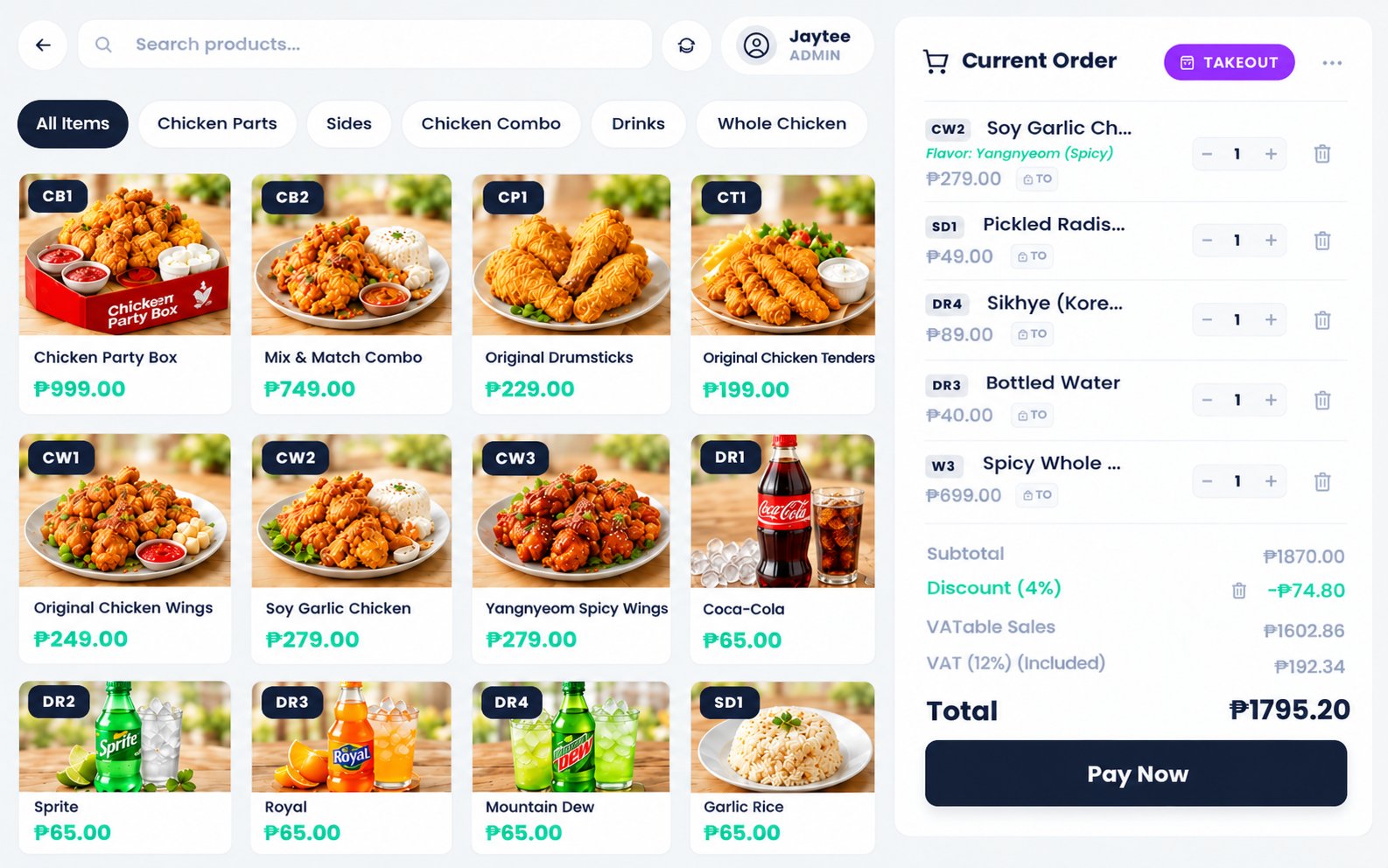
Category tabs, a photo grid with short item codes, and a running order on the right. Shifts open and close with cash reconciliation, and every void is tracked to the staff member who made it.
Orders land in the kitchen instantly
Every ticket shows dine-in or takeout, flavors, and add-ons. The cooks tap Start Preparing, then Mark as Ready, with no paper and no shouting over the counter.
Inventory that deducts itself
Each sale deducts ingredients from its recipe automatically. Owners see total stock value, low-stock and expiring items, and wastage down to the gram, without a weekly manual count.
Know the true cost of every plate
The recipe editor turns ingredients into food cost, overhead, margin, and a simple health indicator, so pricing decisions stop being guesswork.
Numbers an owner actually reads
Gross and net revenue, VAT, cost of goods, operating profit, and top sellers, with Z-reports, daily reports, and CSV export one tap away.
Build a menu in an afternoon
Prices, codes, categories, add-ons, and choice groups (like pick a flavor) are all set up in one form, with live margin feedback as you type.
Mobile
Runs the whole shop from a phone
The same product, re-flowed for one-handed use at a busy counter: selling, flavor choices, checkout, reports, inventory, and KAISHA, the AI marketing assistant.